


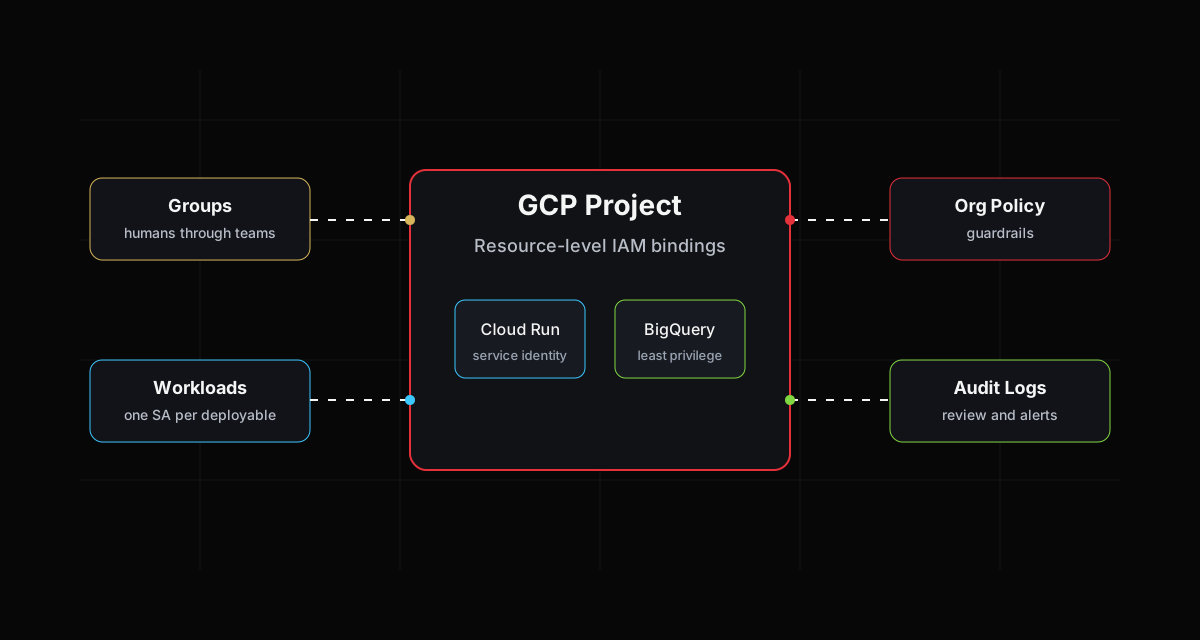
Identity is the control plane of a Google Cloud environment. Network rules, WAFs and scanners matter, but the blast radius is usually decided by who can impersonate what, where roles are attached, and whether anyone reviews policy changes after they happen.
The same five mistakes appear in almost every audit. They are not exotic. They are the result of speed, copy-pasted tutorials and roles that were "temporary" during a release.
1. Project-level Editor is treated as normal
roles/editor is a shortcut that turns into a long-term risk. At project scope it gives broad write access across services, which means a compromised developer account can modify compute, storage, serverless, service accounts and logging configuration.
The fix is not to create hundreds of custom roles immediately. Start by removing project-level basic roles from humans, then move operational access to groups and resource-level bindings.
| Audit signal | Risk | Better pattern |
|---|---|---|
roles/editor on users |
One compromised account can alter most resources | Group-based predefined roles |
| Basic roles on service accounts | Workload compromise becomes project compromise | One service account per workload |
| Many direct user bindings | Access is hard to review | Groups owned by team leads |
gcloud projects get-iam-policy production-project \
  --flatten="bindings[].members" \
  --format="table(bindings.role, bindings.members)"
2. Service account keys still exist
JSON keys are convenient until they are copied into a CI variable, left in a repository fork, or downloaded to a laptop that never gets re-imaged. Long-lived keys turn identity into a secret management problem.
Prefer Workload Identity Federation for CI/CD and platform-native identity for runtime workloads. Cloud Run, GKE and Compute Engine can all use attached identities without static keys.
If a key exists, someone eventually treats it like a password. A platform should not depend on perfect human behavior.
3. One shared service account runs everything
A shared service account is usually created to "unblock deployment." Six months later it is attached to Cloud Run services, jobs, schedulers and data pipelines. Nobody knows which permission is needed by which workload, so nobody removes anything.
Use one service account per deployable unit. The name should explain the workload and environment, for example checkout-api-prod or invoice-worker-staging.
4. IAM is used without Org Policy guardrails
IAM answers who can do something. Org Policy prevents entire classes of dangerous configuration. If IAM is your only boundary, someone with enough permissions can still create public buckets, external IPs or new service account keys.
Minimum constraints worth reviewing:
iam.disableServiceAccountKeyCreationcompute.requireOsLoginstorage.publicAccessPreventionconstraints/run.allowedIngressconstraints/iam.allowedPolicyMemberDomains
5. Policy changes are logged but not reviewed
Most teams can find IAM change logs after an incident. Fewer teams review them before the incident. Audit logs need an owner, an alert route and a review habit.
Create alerts for production IAM policy changes and service account key creation attempts. The point is not noise. The point is to make identity drift visible.
A practical remediation order
| Week | Action | Outcome |
|---|---|---|
| 1 | Inventory basic roles and direct user bindings | Know the current blast radius |
| 2 | Disable new service account key creation | Stop the riskiest future drift |
| 3 | Split shared service accounts by workload | Create least-privilege boundaries |
| 4 | Add IAM change alerts | Make future drift visible |
Final check
Good IAM is boring. A reviewer should be able to answer three questions quickly: who has production access, which workload can call which API, and what changed this week. If those questions are hard, the environment is already carrying security debt.